Roster Cost and Sales-Coverage Planner
Roster Cost and Sales-Coverage Planner
Compare planned service coverage and employer costs with sales and actual payroll costs.
Couldn't load pickup availability
Digital ZIP download after checkout. Editable files and printable PDFs; no physical delivery.
Built for Australian hospitality owners and managers who want an editable working model with clear assumptions.
What you receive
- Blank Excel workbook
- Separate hypothetical worked-example Excel workbook
- Quick-start guide in editable Word and print-ready PDF
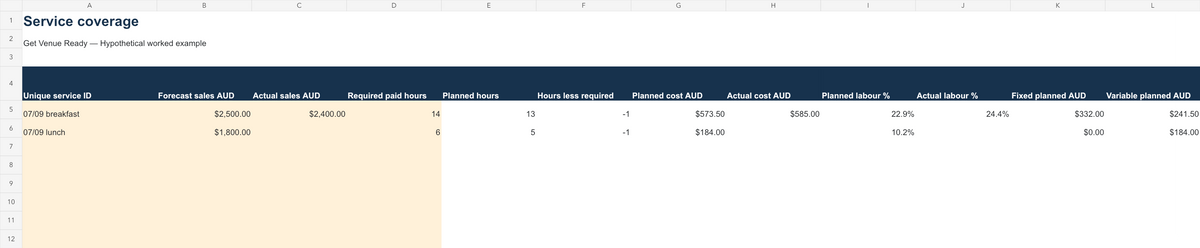
Four sheets: Start Here, Shift costs (80 rows), Service coverage (21 services) and Actions.
Put it to work
- Create unique dated service IDs in Service coverage and enter forecast sales and venue-determined required paid hours.
- Add each role and service to Shift costs. Split entries where pay rates differ.
- Enter verified effective rates, additional on-costs and fixed extras. Confirm the rate only after checking current obligations and recording the source in Actions.
Who it suits
Independent cafés, restaurants and other small hospitality venues using Microsoft Excel to organise their own operating figures.
Formats and delivery
One ZIP download containing two .xlsx files, one .docx and one PDF. Macro-free; no external data connections or software integration. Digital delivery after checkout. No physical item.
Licence and limits
Single-venue business licence. Customise for that venue; do not resell, share or redistribute. No subscription or future-update entitlement is included.
No award classification, penalty/overtime calculation, break-entitlement check, payroll processing or automatic roster approval. Check national or WA state-system applicability with an adviser. General operational information only. Confirm requirements with qualified advisers.
Read the refund policy and contact GVR for support.
Related guidance
Read the related practical guide. For daily operating records, explore the Café Operations Pack.